
You land on https://costmytokens.com/ (Cost My Tokens) for the first time. What's unclear, what makes you leave, and what would make you sign up?
Page reviewed
LLM API Cost Calculator — Official Token Prices
https://costmytokens.com/ (opens in a new tab)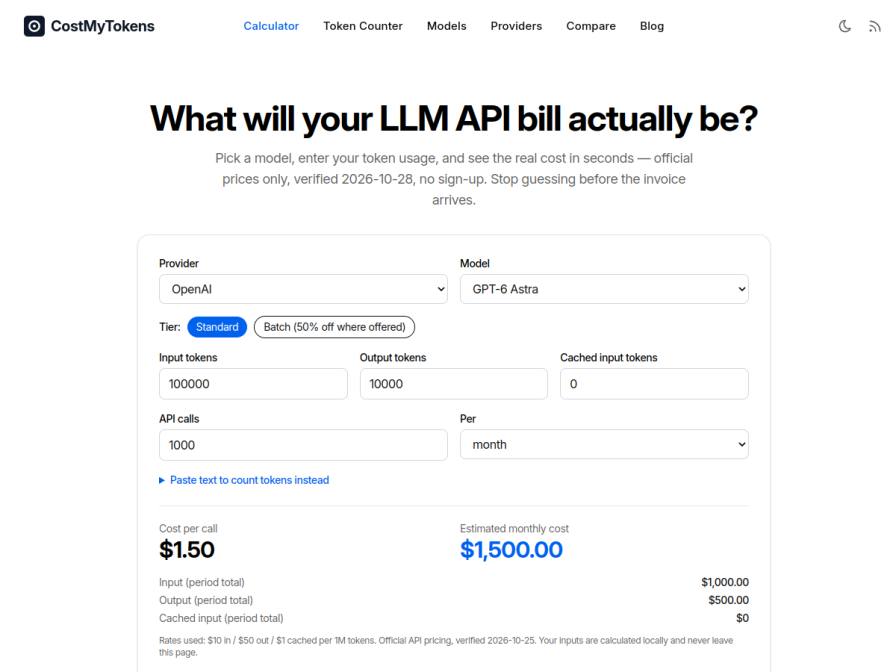
10 fictional AI personas. Exploratory perspectives, not a survey of real customers. Methodology & limitations
Simulated interest
AI synthesis, not measured demand
Suggested price range
No numeric price estimates in the answers. Ask a pricing follow-up to collect them.
Response sentiment
What this panel suggests
First-time visitors seem to immediately understand the core value: a free, local LLM cost calculator with no sign-up. That low-friction promise is the main hook, and it aligns with the page’s claim that calculations run in the browser and official prices are used. The main blockers are clarity and trust, not basic usefulness. Respondents were unsure about how token counting works for models where the site itself says counts are estimates, especially for Anthropic and Google, so they want a clearer explanation of the margin of error and methodology. The other confusing area is the Batch tier: although the page shows “Batch (50% off where offered),” people were not sure how to apply it or whether it changes anything by default. What would make them sign up is not access to the calculator itself, but persistence: saving calculations, comparing costs over time, exporting, or integrating with an ops sheet. In short, the site feels useful, but sign-up only becomes attractive once it adds workflow memory and collaboration.
Pricing & positioning
Keep the core calculator free and anonymous. If you introduce sign-up, make it optional and tied to saved scenarios, exports/history, comparisons over time, or team workflow features rather than basic calculation.
No willingness-to-pay evidence was collected, so monetization should be treated as untested. Do not infer rejection from the absence of WTP data.
Recurring themes
“The fact that it calculates locally and doesn't require sign-up is a definite plus.”Read Jared Deckow’s response →
“What's unclear to me is how the token counting works for models where Anthropic and Google haven't published official browser tokenizers – the page mentions they are 'estimates.'”Read Jared Deckow’s response →
“Also, while the "Batch (50% off where offered)" tier is mentioned, the calculator defaults to "Standard," and I'm not seeing an immediate way to apply that discount directly in the main calculator interface.”Read Jared Deckow’s response →
“I would consider signing up if there was an option to save calculations or compare costs over time, perhaps integrating with our existing ops sheet.”Read Ines Mol’s response →
Objections to investigate
- Lack of clarity on estimation methodology for non-OpenAI models
- Confusion regarding the automatic application of batch discounts
- Absence of features to save, export, or track historical calculations
Use these findings to plan customer interviews or experiments. How to interpret AI research
What the panel said
Click a name to open that persona’s full profile.
Jared DeckowneutralThis looks pretty useful for quickly estimating costs, especially with the direct comparison to official OpenAI and Anthropic rates. The fact that it calculates locally and doesn't require sign-up is a definite plus. What's unclear to me is how the token counting works for models where Anthropic and Google haven't published official browser tokenizers – the page mentions they are 'estimates.' I'd want to understand the margin of error there. Also, while the "Batch (50% off where offered)" tier is mentioned, the calculator defaults to "Standard," and I'm not seeing an immediate way to apply that discount directly in the main calculator interface. I’d sign up if there was a way to save these calculations or perhaps integrate with our staging logs to automatically pull token counts. For now, it’s a good starting point for manual checks, but I’d leave if the "estimated" token counts were too imprecise for my planning needs.
Simulated interest: 70/100
Jonte MetznerneutralThe core functionality is immediately clear: input usage, see cost. The lack of sign-up is a significant plus, aligning with my need for direct data. What's less clear is the "Batch (50% off where offered)" tier; I'd need to understand how that applies in practice. Also, the "cached input tokens" field is a bit vague. If the pricing and token counting are as transparent as advertised, and if it handles multiple providers and allows for custom comparison of actual per-call costs (not just estimates), I would consider signing up. I'm always looking for ways to optimize, and if this tool can reliably show me where to shave off costs beyond what I already track, it's worth exploring.
Simulated interest: 70/100
Stella RolfsonneutralAs someone who constantly estimates token usage for clients, Cost My Tokens looks promising—if it delivers what it claims. The interface is straightforward: pick a model, enter token counts, and get an estimate. I like that it’s no sign-up, and the prices are verified. But I’d need to test it extensively. Right now, I rely on my own scripts and spreadsheets, but a verified tool could save time. That said, I’m always cautious with third-party calculators. Do these use the exact same tokenization as the APIs? How often are the prices updated? I’d need to compare outputs against actual invoices before trusting it for client proposals. The ‘Compare’ feature could be useful, but I’d want to ensure it’s accurate. Overall, worth exploring, but not replacing my current workflow yet.
Francis CarterneutralThe core functionality of calculating LLM API costs is clear, and the ability to do so without sign-up is a definite plus, especially given my need to quickly estimate budgets. What's less clear initially is how the token counting for models without direct browser tokenizers is handled, and I'd want to understand the verification process for these estimates. While the listed prices are helpful, seeing potential variations or actual gateway prices alongside official ones would be valuable. The "Batch (50% off where offered)" tier is intriguing, but it's not immediately clear if that's applicable to all models or how to access it. To sign up, I'd need more transparency on the methodology for non-official token counts and perhaps a way to save and compare multiple model projections over time for future planning.
Ines MolneutralThe premise of this tool is directly relevant to my work. I'm intrigued by the ability to calculate LLM API costs, especially since I spend a significant amount of time comparing OpenAI and Azure OpenAI pricing. What's unclear is how the "Batch (50% off where offered)" tier actually works in practice – does it require a specific commitment or is it automatically applied? Also, the "cached input tokens" field seems a bit vague; I'm not sure if that directly maps to how we use tokens internally. The fact that no sign-up is required is a definite plus. I would consider signing up if there was an option to save calculations or compare costs over time, perhaps integrating with our existing ops sheet.
Simulated interest: 50/100
Dinesh GillneutralThe page title and description are clear enough, and the calculator interface seems straightforward for estimating costs. What's not immediately clear is how the 'Batch (50% off where offered)' tier actually works in practice – does it apply automatically, or is there a separate setup? Also, the "Paste text to count tokens instead" feature is interesting, but how accurate are those counts for models where Anthropic and Google don't provide official browser tokenizers? The verification dates for the prices are good, but I'd prefer to see actual gateway prices alongside official ones, as that's what we deal with daily. I'd sign up if there was a way to save these calculations or compare multiple gateways directly within the platform, not just models.
Bradley MarquardtneutralThe Cost My Tokens page looks promising, but a few things make me hesitant. First, I'm not entirely clear on how the batch discount is applied—does it automatically reflect in the estimate, or is it just a note? My current process involves a lot of manual spreadsheet adjustments for these kinds of variables, so if this tool can simplify that, it might be worth trying. However, I'm skeptical about the accuracy of token counts for models like Anthropic and Google, since it says they don't have official browser tokenizers. That could lead to discrepancies as I've seen with my Frankensteined calculator. The lack of a sign-up requirement is great, but I'd need to confirm this integrates with my existing workflow or compare it side-by-side before committing. If it can save me time and reduce errors, I might give it a shot.
Simulated interest: 60/100
Turold AubertneutralThe interface is quite clear; selecting a model and inputting usage figures to get an immediate cost estimate is straightforward. I appreciate that it doesn't require sign-up. What's unclear is the exact definition of 'cached input tokens' in this context and its pricing impact. Also, the mention of "GPT-6" models seems a bit ahead of current actual releases, which raises a slight question about the timeliness of the data, although the verification dates are provided. To sign up, I would need to see a clear benefit beyond the current anonymous calculator, perhaps historical tracking or more detailed comparison features for saved scenarios.
Simulated interest: 40/100
Laura KihnneutralThe main thing that's unclear is how the token counting for non-OpenAI models works. It says estimates are used for Anthropic and Google, but doesn't explain the estimation method, which is a bit concerning. I'd also appreciate more clarity on whether the 'Batch (50% off where offered)' tier automatically applies or if I need to do something extra to get that discount. What would make me sign up, or at least save the site, is if there was a way to export the data or save my calculations, perhaps as a CSV, so I could easily slot it into my personal spreadsheet for tracking costs. That would be really helpful for my current workflow.
Don GrahamneutralThis site looks pretty useful for getting a handle on LLM costs, which is exactly what I'm doing now. The fact that it uses official prices and doesn't require sign-up is a big plus. What's a little unclear is the "Batch (50% off where offered)" tier – I'd need to understand how that actually applies to my usage. Also, it calculates costs based on input, output, and cached tokens, but I'm not always sure about my cached token usage beforehand. I'd sign up if there was a way to save my calculations or perhaps integrate it with something to pull actual usage data, though for now, just having this calculator available without signup is good enough for my current estimation needs.
Keep exploring.
Find your next question or see which topics divide AI panels.
What would you ask next?
Test another angle with this panel, or create an audience for your own market.