
Looking at TurnShift (https://turnshift.app/): what price would make it a no-brainer for you, and at what price would you stop considering it? What would you expect to get for that money? Also say the maximum you would pay per month in USD (0 if nothing).
Page reviewed
TurnShift - Team calendar and shift scheduling in Slack
https://turnshift.app/ (opens in a new tab)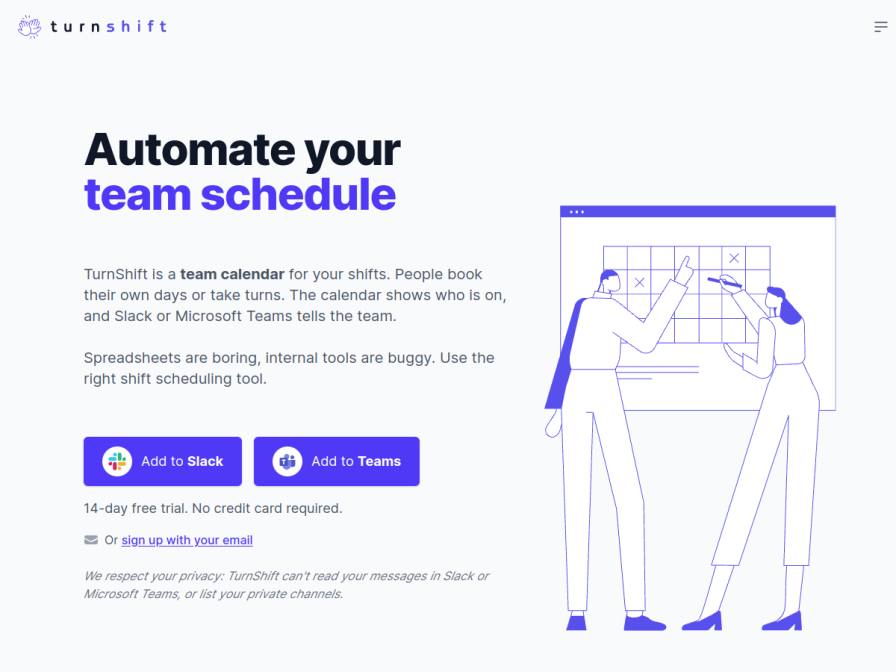
10 fictional AI personas. Exploratory perspectives, not a survey of real customers. Methodology & limitations
Simulated interest
AI synthesis, not measured demand
Suggested price range
Median $15 · simulated willingness to pay
Response sentiment
What this panel suggests
Prospects are broadly positive about TurnShift because it solves a practical workflow problem: shift scheduling, reminders, and visibility inside Slack or Teams, with reporting that can replace manual coordination. The strongest reactions center on saving time and reducing spreadsheet-based admin rather than on novelty. Pricing sentiment is cautious but not dismissive. The aggregate willingness-to-pay data shows a modest ceiling overall, suggesting buyers want the product to feel inexpensive relative to the work it removes. Several responses also reveal a preference for simple, predictable pricing, with concern that per-user billing may scale awkwardly for small teams or groups whose headcount changes often. That makes a flat cap an appealing follow-up hypothesis, even though the panel is not rejecting per-user pricing outright. The main monetization question is therefore not whether to charge, but how to package the value so the cost feels like an easy trade for fewer manual tasks, cleaner scheduling, and better team coordination.
Pricing & positioning
Test a low-friction entry tier and a flat team-cap option alongside the current per-user model. The responses suggest the product can justify paid adoption, but buyers are sensitive to costs that scale awkwardly with small or fluctuating teams.
The value story that matters is time saved from manual coordination: Slack-native scheduling, reminders, visibility into who is on shift, and reporting. Pricing should be positioned as paying for operational simplicity, not just calendar storage. A predictable cap may be especially attractive to smaller teams and groups with variable staffing.
Recurring themes
“I'd expect seamless Slack integration, reliable notifications”Read Olivia Powlowski’s response →
“What I expect is for it to directly replace the manual data entry from Deputy into spreadsheets”Read Caleb Hansen’s response →
“If it costs more than $5 per user per month, I'd have to seriously reconsider”Read Caleb Hansen’s response →
Objections to investigate
- Small-team budget sensitivity / per-user pricing feels expensive as headcount grows
- Uncertainty about what features are included for the price
Use these findings to plan customer interviews or experiments. How to interpret AI research
What the panel said
Click a name to open that persona’s full profile.
Olivia PowlowskipositiveThe "Start Scheduling Shifts for" price of €3.50 / user / month seems reasonable, especially with annual billing offering two months free. For my 12-person team, that would be around $44/month, which feels like a no-brainer for automating the rota and reducing the friction I deal with daily. Honestly, I wouldn't consider paying more than $75 per month for this. I'd expect seamless Slack integration, reliable notifications, and easy management of shift swaps and coverage across our time zones. It's unclear if the API and AI features are included in the standard plan, which would be a significant plus.
Simulated interest: 80/100
Caleb HansenpositiveThe stated price of €3.50 per user per month seems reasonable, especially with the annual billing discount. If it converts to about $4 per user per month, that would be a no-brainer for me. What I expect is for it to directly replace the manual data entry from Deputy into spreadsheets, saving me those tedious evening hours. If it costs more than $5 per user per month, I'd have to seriously reconsider.
Simulated interest: 75/100
Chetan ChattopadhyayneutralTurnShift looks promising for my team's scheduling needs, especially since we already use Slack. The ability to automate shift assignments and sync with Slack would save me those 4 hours weekly I spend on Excel. The €3.50/user/month price seems reasonable, but I'd need to confirm currency conversion to INR. A no-brainer would be under $5/user/month—ideally $3.50 as advertised, but I’d need clarity on Slack integration limits. If TurnShift handles time zones better than my Excel macros and reduces my weekend scheduling headaches, it’s worth considering. Maximum I’d pay: $4/user/month, but only if the trial confirms reliability during Pune’s monsoon outages.
Simulated interest: 75/100
Luzie KrabbeneutralFor a small studio like ours, where we occasionally bring in freelancers during busy periods, the concept of TurnShift sounds promising. It could definitely help with the "inconsistent availability tracking" problem. A 'no-brainer' price would be around $2-3 per active user per month. I'd expect core scheduling, easy integration with Slack, and perhaps some basic reporting. If it crept up to $7-10 per user, I’d start to question if it’s worth it, especially since our team is small and often changes. The current advertised price of €3.50 per user per month (which is roughly $3.80 USD) feels about right, though I'd need to see how it scales with freelancers. Ultimately, my maximum would be around $40 USD per month for the entire team, assuming that covers occasional freelancers too.
Simulated interest: 70/100
Audeline DuvalpositiveThe idea of automating my team's coverage schedule is very appealing, especially for holidays which are always a challenge. The pricing of €3.50 per user per month for annual billing seems quite reasonable for the features offered, especially since you only charge for active users. If it truly simplifies the process and reduces my administrative load, a no-brainer price point for me would be around $3 per user per month. I would probably stop considering it if it reached $7 per user per month, as the complexity of managing it might outweigh the benefits at that point. For the stated price, I would expect seamless integration with Slack, reliable notifications, and an intuitive interface for both team members and myself to manage the roster. My maximum acceptable price would be $4 per user per month.
Simulated interest: 75/100
Maarten VisserpositiveThis looks promising, especially the Slack integration. Currently, I'm juggling When I Work and spreadsheets, which is a pain. The idea of people booking their own shifts or taking turns automatically is exactly what I need to streamline things for my team of four in-house and our freelancers. If it could handle our rotation complexities reliably and integrate seamlessly with Slack for notifications and updates, a no-brainer price for me would be around $2 per user per month. Anything over $4 per user per month would make me reconsider, especially given my budget constraints and the fact that I'm only paying for active users. So, my maximum is $4 per user per month.
Simulated interest: 85/100
Hugo Alcalá AdornopositiveThis looks like it could really solve the headache of our current scheduling mess with the Google Sheet. If it could handle our team of six plus a few freelancers seamlessly, I'd consider anything up to €20 per month for the whole team a no-brainer. Anything more than €30 per month, and I'd start thinking it's just too much for what we need. We’d expect robust Slack integration, easy assignment of recurring and ad hoc shifts, and clear visibility for everyone. The advertised €3.50 per user per month is definitely in the sweet spot.
Simulated interest: 80/100
Kendra VonpositiveThe 'annual billing' price of €3.50 per user per month sounds reasonable, especially since it includes all features and they only charge for active users. For my team of 10, that would be around $38 per month, which is well within reason for something that could replace my spreadsheet. I'd definitely stop considering it if it were over $10 per user per month, as that would start to feel like a significant cost for what is essentially a scheduling tool. I'd expect robust integration with Slack and easy management of rotations and coverage.
Simulated interest: 75/100
Bilwa ArorapositiveThis TurnShift tool looks interesting, especially the Slack integration for notifications and booking reminders. It could potentially solve my problem with people not confirming shift swaps promptly. The pricing of €3.50 per user per month seems reasonable, especially if it covers all features and is based on active users. A no-brainer price for me would be around $3 per user per month. Anything over $6 per user per month would make me reconsider, as I need to be mindful of our budget. I'd expect it to significantly reduce the manual effort of managing schedules and communication, and handle last-minute call-outs more smoothly.
Simulated interest: 75/100
Clarence HoegerneutralThe pricing for TurnShift is €3.50 per user per month, billed annually. For a tool that promises to automate my team's rota, I'd consider it a no-brainer if it cost around $10-$15 per month total for my 5-person team, assuming it fully integrates and simplifies my current spreadsheet wrangling. Anything over $25 per month would make me pause, as I'm always cautious about introducing new costs and need to see a clear, significant time-saving benefit to justify it. My maximum acceptable price would be $15 per month.
Simulated interest: 60/100
Keep exploring.
Find your next question or see which topics divide AI panels.
What would you ask next?
Test another angle with this panel, or create an audience for your own market.