
What would stop you from trying Pipeta (https://pipeta.app/) this month? Be specific about how you handle this today. Also say the maximum you would pay per month in USD (0 if nothing).
Page reviewed
Pipeta - The Color Picker That Lives in Your Menu Bar
https://pipeta.app/ (opens in a new tab)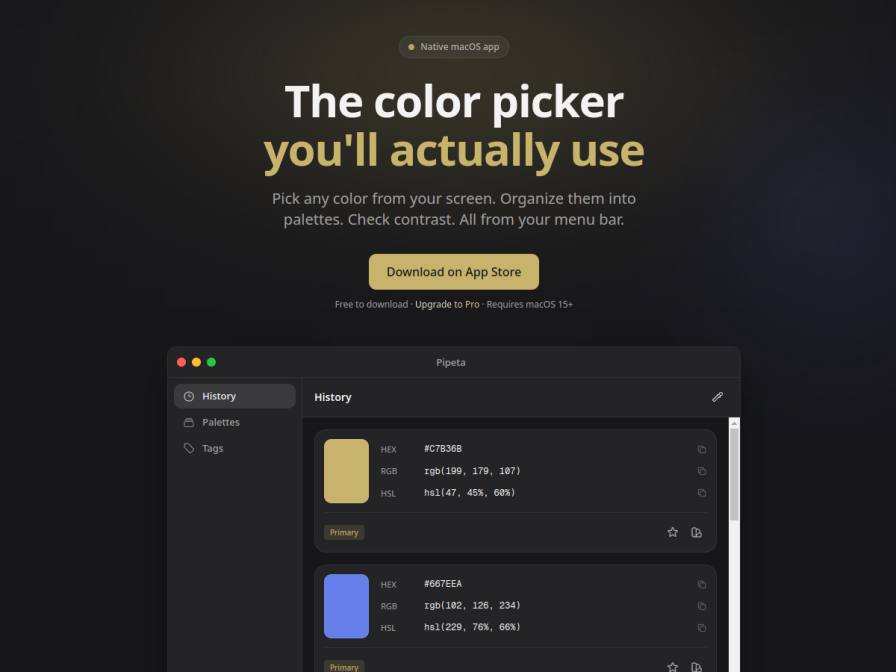
10 fictional AI personas. Exploratory perspectives, not a survey of real customers. Methodology & limitations
Simulated interest
AI synthesis, not measured demand
Suggested price range
Median $5 · simulated willingness to pay
Response sentiment
What this panel suggests
Interest is moderate, but the main answer to "what would stop you from trying this month" is switching friction, not disbelief in the product idea. Respondents described current habits like manually sampling colors from screenshots, competitor sites, and images, then recording hex values in spreadsheets, Excel, Notion, or Figma libraries. Several wanted to know how Pipeta would fit into their existing handoff and documentation workflow before adding another tool. A second barrier is pricing clarity: one respondent described it as "subscription-based" even though the page says "No subscriptions. Pay once, use forever," so the monthly question may have been interpreted as hypothetical. The free tier's last-five-colors limit also showed up as a blocker. The supplied WTP sample centers around $5/month, with the upper end at $9.99, but that should be treated cautiously given the pricing mismatch. Overall sentiment is mostly neutral, with objections focused on integration and replacing current workarounds.
Pricing & positioning
Treat this as a workflow-fit problem first, not a pure pricing problem. Clarify pricing prominently because the page says "No subscriptions. Pay once, use forever," while some respondents talked as if it were subscription-based or were reacting to upfront commitment. If you test recurring pricing anyway, keep entry pricing low and make the free tier clearly useful.
The provided willingness-to-pay sample centers around about $5/month, with a high of $9.99, but this is a small sample and may reflect the monthly framing rather than true subscription intent.Current friction is mostly about replacing spreadsheets, screenshots, Notion, Excel, and Figma-side color tracking; pricing alone does not appear to be the main blocker.Because the page itself markets a one-time Pro upgrade, monthly WTP answers should be treated as hypothetical unless the pricing model changes.
Recurring themes
“My current process involves manually sampling colors from screenshots and competitor sites, then meticulously logging hex values in a shared spreadsheet for handoff.”Read Jody Grimes’s response →
“I'm hesitant to adopt another tool without a clear integration path into Figma or our developer handoff process.”Read Jody Grimes’s response →
“Honestly, the fact that I'm already paying for a color utility and have a solid Notion system for palettes makes it hard to justify adding another tool, especially one that's subscription-based.”Read Rodolfo King’s response →
Objections to investigate
- Lack of integration with existing tools (Figma/Sheets)
- Satisfaction with current manual/free workarounds
- Pricing-model confusion / upfront commitment concern
- Uncertainty about free version limits
Use these findings to plan customer interviews or experiments. How to interpret AI research
What the panel said
Click a name to open that persona’s full profile.
Jody GrimesneutralMy current process involves manually sampling colors from screenshots and competitor sites, then meticulously logging hex values in a shared spreadsheet for handoff. It's functional, but definitely time-consuming and can lead to minor inconsistencies. Pipeta sounds like it could streamline this significantly, especially the history and palette organization features. However, I'm hesitant to adopt another tool without a clear integration path into Figma or our developer handoff process. I would be willing to pay up to $5 per month for a tool that truly simplifies color management and ensures consistency. It's also unclear if the Pro features like harmonies and contrast checking are crucial for my workflow right now, or if they're just nice-to-haves.
Simulated interest: 65/100
Angelo ShieldsneutralRight now, I'm using a paid menu-bar picker, which works fine, but it’s a manual process to get values into our shared token file and Notion spec. Pipeta’s promise of workflow focus is interesting, especially the unlimited history and palettes. However, the product page mentions a "Pro" version with features like color harmonies and WCAG contrast checks, but it doesn't clearly state if the free version includes basic color sampling and copying from anywhere. If the free version is limited to just the last five picked colors, that would be a blocker. I'd be willing to pay $5 per month, but only if the Pro features are truly robust and integrate seamlessly into my existing workflow.
Simulated interest: 60/100
Emelie RaubuchneutralMy current process for managing colors is quite manual; I extract them from images on my Mac and then meticulously organize them in Excel and Figma libraries. It's time-consuming and prone to small errors. Pipeta seems promising, especially the ability to pick colors from anywhere and organize them. However, the "Pro" features like harmonies and contrast checking are a one-time purchase of $9.99. I prefer monthly subscriptions for software as it aligns better with my budget and allows for trying things out without a large upfront commitment. If it were a monthly subscription, I might consider it.
Simulated interest: 40/100
Dandak TagoreneutralMy current process involves manually pulling colors from competitor websites and documenting them in Airtable. While Pipeta's features like unlimited history, harmonies, and contrast checking sound useful, I'd need to see how seamlessly it integrates into my workflow on my MacBook Air before committing. The 'Pro' version's one-time fee of $9.99 is certainly appealing, given my focus on efficient spending for our startup. I'm willing to pay up to $9.99 for a one-time purchase.
Simulated interest: 75/100
Bernice HeaneyneutralHonestly, trying Pipeta this month would be a bit tricky. My current workflow, while a bit clunky, involves using free browser tools and my Google Sheet, which I've gotten pretty used to. The biggest hurdle would be justifying the cost when I have a functional, albeit time-consuming, system already in place, especially since my company doesn't really have a budget for design tools. I'd need to see a really significant time-saving benefit. The $9.99 one-time price for Pro seems reasonable for what it offers, but I'd probably want to try the free version extensively first to see if it truly streamlines things enough to be worth the upgrade. For now, my budget is maxed out with my current setup.
Simulated interest: 60/100
Rodolfo KingneutralHonestly, the fact that I'm already paying for a color utility and have a solid Notion system for palettes makes it hard to justify adding another tool, especially one that's subscription-based. I'm pretty meticulous about my workflow; when I need a color from a screenshot, I use manual sampling, which, while tedious, gets the job done and is free. The Pro version costs $9.99 one-time, which I could potentially swing if it offered something truly revolutionary that my current setup doesn't. But for now, the free version seems to have limitations on history, which is a core part of my process. I would pay a maximum of $5 per month for a tool like this, but only if it genuinely streamlined my workflow beyond what I have now. The current pricing of $9.99 one-time purchase for Pro is slightly higher than I'd ideally like for a tool I'm not entirely convinced I need yet.
Simulated interest: 30/100
Laurie OrtizneutralMy current workflow for managing color swatches involves meticulous organization within Figma libraries and spreadsheets for review cycles. While Pipeta's features like "WCAG Contrast" and "Color Harmonies" are appealing, especially for ensuring consistency and accessibility, I'm hesitant to introduce another tool this month. We're in the midst of a significant design system overhaul, which consumes most of my team's bandwidth and requires rigorous documentation and adherence to established guidelines. I would consider a one-time payment of $10 for a tool like this if it demonstrably streamlined my current processes, but it's not a priority right now.
Simulated interest: 30/100
Gabriel Solano MonroyneutralThe biggest hurdle for me right now is the sheer amount of manual work I do to track colors in my Google Sheet. Pipeta's promise of unlimited history and palettes is appealing, but I'm hesitant because I'm used to having everything in one central, shareable document. I'm not sure how Pipeta's organization features would integrate with my current workflow, especially since my agency relies on that shared sheet for consistency across projects. The idea of a one-time payment for Pro is great; I'd be willing to pay up to $5 one-time for the Pro features.
Simulated interest: 70/100
Elakshi BhatneutralGiven my current workflow, I’d be hesitant to switch to Pipeta this month because I rely heavily on my existing color references in Photoshop and Google Sheets. My team and I have painstakingly maintained these across several projects, and transitioning would add a layer of complexity, especially during our busy season. Additionally, I’m unsure about how seamlessly Pipeta integrates with our Adobe ecosystem and whether it can replace the shared Google Sheets we use. The app does look promising, particularly the palette organization and contrast-checking features—those could save us time in the long run. However, with our tight deadlines, any software transition needs to be fail-proof. I’m open to trying it eventually, but I can’t commit to testing new tools during peak season. My max acceptable price would be $6.99 per month, but only if it proves to be a game-changer in simplifying our workflow.
Simulated interest: 40/100
Mohamed AlipositiveThe fact that Pipeta offers a one-time purchase for Pro is very appealing. My current workflow involves meticulously checking color values with the system picker and then manually reconciling them between Figma and code, which is a constant friction point. Pipeta's promise of a native macOS color picker that lives in the menu bar and handles unlimited history, harmonies, and contrast checks directly addresses this. The biggest hurdle would be integrating it seamlessly with my existing Airtable palette management – I'd need to see if I can export palettes directly to a format I can use or if it requires additional steps. If it genuinely simplifies the color reconciliation process without adding new manual work, I'd consider it. I'd be willing to pay $9.99 one-time for the Pro version.
Simulated interest: 75/100
Keep exploring.
Find your next question or see which topics divide AI panels.
What would you ask next?
Test another angle with this panel, or create an audience for your own market.