
You already track your budget in Excel, Google Sheets, a notebook or another app. Which ONE offer would most get you to try AI Budget Assistant this week: (A) 'Import your spreadsheet in one tap and keep your own categories', (B) 'Add expenses by voice or a receipt photo, no typing', (C) 'Import from your bank, no manual entry', or (D) 'One live budget shared with your whole family'? Pick one, say why, and name the one thing that would still stop you switching.
Page reviewed
AI Budget Assistant - budżet domowy z asystentem AI
https://ai-budget.pl/ (opens in a new tab)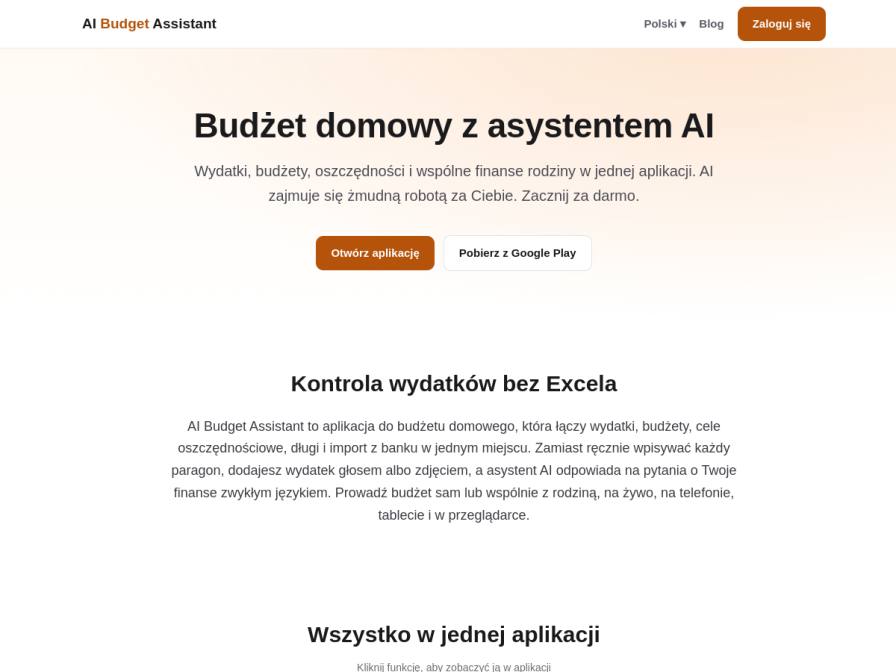
10 fictional AI personas. Exploratory perspectives, not a survey of real customers. Methodology & limitations
Simulated interest
AI synthesis, not measured demand
Suggested price range
No numeric price estimates in the answers. Ask a pricing follow-up to collect them.
Response sentiment
What this panel suggests
This batch was overwhelmingly pulled toward offer B: adding expenses by voice or receipt photo with no typing. The core appeal is simple friction removal. For people already tracking budgets in Excel, Google Sheets, or a notebook, manual entry feels like the chore they most want to eliminate. Voice input and receipt scanning were framed as a faster, less annoying way to keep up with real spending in the moment. The main thing that would still stop switching is transition risk. Respondents want confidence that their existing categories, history, and spreadsheet setup can move over cleanly without extra work or messy reclassification. That concern matters even though the product page also promises spreadsheet import with custom categories; the hesitation here is about whether the migration experience will actually feel seamless in practice. Secondary blockers are typical trust questions: whether receipt parsing is accurate enough, whether data stays private, and whether bank imports cover what they need. Overall, the message that resonates most is convenience-first automation, not family sharing or bank import as the initial hook.
Recurring themes
“My biggest pain point is just the sheer volume of transactions and trying to keep up with logging them”Read Ana Hansen’s response →
“Having a way to quickly add expenses without typing would be a game-changer”Read Ana Hansen’s response →
“I'm not sure how seamlessly it would integrate with my existing categories in Google Sheets”Read Ana Hansen’s response →
Objections to investigate
- Integration with existing spreadsheets/categories
- AI accuracy in receipt parsing
- Data security and privacy concerns
- Bank connectivity limitations
Use these findings to plan customer interviews or experiments. How to interpret AI research
What the panel said
Click a name to open that persona’s full profile.
Ana HansenpositiveHonestly, option (B) 'Add expenses by voice or a receipt photo, no typing' is the most appealing. My biggest pain point is just the sheer volume of transactions and trying to keep up with logging them, especially when I'm busy. Having a way to quickly add expenses without typing would be a game-changer. The fact that you mention AI doing the tedious work is also very attractive. What still stops me switching is that I'm not sure how seamlessly it would integrate with my existing categories in Google Sheets, and if it can truly capture everything accurately without me double-checking constantly.
Simulated interest: 80/100
Doyle ConroypositiveOption (B) 'Add expenses by voice or a receipt photo, no typing' would most tempt me to try this AI Budget Assistant this week. My current system involves a shoebox full of receipts and a lengthy spreadsheet session at month's end, which takes about four hours. The ability to just snap a photo or speak an expense in sounds like a dream. However, what would still stop me switching is not knowing how well it syncs with my bank accounts or if it handles multiple income streams and business expenses separately from personal ones, as that's crucial for my freelance work.
Simulated interest: 75/100
Draupadi EmbranthiripositiveOption (B) 'Add expenses by voice or a receipt photo, no typing' would most get me to try this AI Budget Assistant this week. My current weekend ritual of reconciling UPI and cash expenses in Excel is quite time-consuming. The idea of just using my voice or snapping a photo of a receipt to log expenses sounds incredibly efficient and would significantly reduce that burden. The one thing that would still stop me switching is how well it integrates with my existing savings tabs for travel and my son's future education fund. I'd need to be sure I could still track those specific goals easily, as they're crucial for our long-term planning.
Simulated interest: 75/100
Lennox FeldpositiveOption B, 'Add expenses by voice or a receipt photo, no typing,' would be most compelling for me. While we use a budgeting app, the manual entry of smaller expenses, especially from supermarkets and pharmacies, is still a bit tedious. The ability to simply take a photo of a receipt would streamline that process significantly. However, what would still stop me from switching immediately is understanding how it handles custom categories and the security of importing my financial data. We've invested time in setting up our existing categories, and ensuring data accuracy and privacy is paramount.
Simulated interest: 75/100
Émeline AdampositiveThe offer to 'Add expenses by voice or a receipt photo, no typing' (B) is the most appealing. My evenings are quite full after a long day at the clinic, and spending 30 minutes meticulously writing down every expense is something I'd prefer to simplify. Being able to just speak or take a quick photo would save precious time. However, I'm hesitant about sharing financial information digitally and would need to be absolutely sure of the app's security and privacy before entrusting it with our family's finances. The idea of importing from the bank (C) is also interesting, but the privacy concern is paramount.
Simulated interest: 70/100
Ensar SmeetspositiveGiven that my partner and I are meticulously tracking our baby expenses, rent, and savings, option (B) 'Add expenses by voice or a receipt photo, no typing' is the most appealing. Manually entering data from receipts is quite time-consuming. I'd be curious to see how accurate the AI is with parsing receipts. However, what would still stop me from switching this week is the initial setup and ensuring all our existing categories and historical data from our spreadsheet can be accurately imported. I need to be confident that the transition won't create more work or lead to inaccuracies.
Simulated interest: 75/100
Sabrina BernierpositiveHonestly, option (B) 'Add expenses by voice or a receipt photo, no typing' sounds the most appealing right now. Juggling spreadsheets and receipts for our flat feels like a constant admin task, and anything that cuts down on typing is a win. Plus, I'm always on the go, so being able to just snap a photo or speak an expense would be brilliant for tracking shared groceries or when one of us pays for something upfront. While (C) 'Import from your bank, no manual entry' sounds like a dream for simplifying things, I'm a bit hesitant because I'm not sure if it connects with UK banks easily. My biggest hang-up would still be privacy; I'd need to be really sure my financial data is secure, especially when dealing with shared household finances and my personal budget.
Simulated interest: 75/100
Jana GloverpositiveOption (B), 'Add expenses by voice or a receipt photo, no typing,' would be the most compelling for me this week. My current system with YNAB is robust, but the sheer volume of transactions from cards and cash means manual entry can be time-consuming. The ability to photograph receipts for irregular spending, as I already do, and add expenses via voice is incredibly appealing, directly addressing a pain point in my current process and aligning with my meticulous nature. What would still stop me switching is understanding how well it integrates with my existing YNAB categories and goals, especially since my partner and older child have visibility into selected areas.
Simulated interest: 75/100
Wincenty KrólikowskipositiveOpcja B, dodawanie wydatków głosem lub zdjęciem paragonu, najbardziej by mnie zachęciła. Zdarza mi się zapominać o wpisaniu drobnych wydatków, a te paragony często lądują w kieszeni. To byłoby znacznie szybsze niż moje obecne metody. Chociaż, jeśli miałbym wybrać jedną rzecz, która by mnie powstrzymała, to wątpię, czy aplikacja byłaby w stanie idealnie rozpoznać wszystkie pozycje z paragonów, szczególnie te małe i niewyraźne.
Simulated interest: 75/100
Baidehi ChattopadhyaypositiveOption (B) 'Add expenses by voice or a receipt photo, no typing' is the most appealing offer. I already meticulously log UPI payments and scan receipts for larger purchases, so automating that further with voice or a photo sounds like a significant time-saver. My current system is quite manual, and this feature directly addresses a pain point. However, what would still stop me from switching is understanding how seamlessly it integrates with my existing Excel budget. I need to ensure the AI assistant can either export data in a compatible format or, ideally, sync with it directly without losing the custom categories I've set up.
Simulated interest: 75/100
Keep exploring.
Find your next question or see which topics divide AI panels.
What would you ask next?
Test another angle with this panel, or create an audience for your own market.