
You land on https://runclaw.sh/ (Runclaw) for the first time. What's unclear, what makes you leave, and what would make you sign up?
Page reviewed
RunClaw - Launch your OpenClaw agent in seconds
https://runclaw.sh/ (opens in a new tab)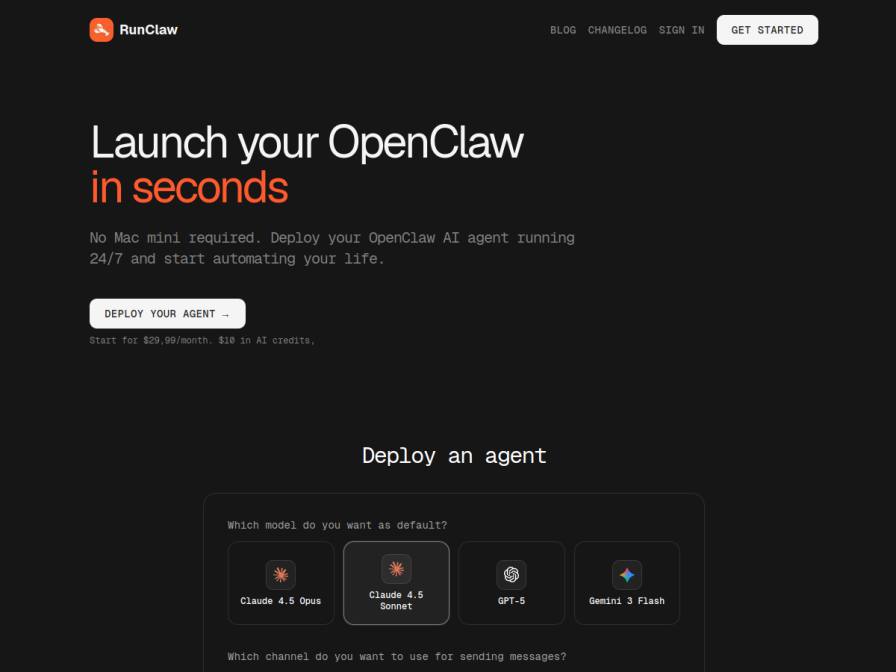
10 fictional AI personas. Exploratory perspectives, not a survey of real customers. Methodology & limitations
Simulated interest
AI synthesis, not measured demand
Suggested price range
No numeric price estimates in the answers. Ask a pricing follow-up to collect them.
Response sentiment
What this panel suggests
Interest is moderate, but the first-time experience is mostly held back by comprehension rather than price. The central confusion is what an "OpenClaw agent" actually is: several responses treat it as undefined or too abstract, so the landing page does not yet make the product concrete enough. The page’s promise to "Deploy your agent in seconds" also triggers skepticism because the same page describes Telegram token setup, OpenRouter keys, and VPS/SSH/node-related work, which makes the experience feel less instant than the headline suggests. Respondents also noticed the Telegram dependency and the note about limited cloud servers, which raised questions about fit, reliability, and whether the service is sustainable over time. What would move people forward is a plain-language explanation of what the agent does in practice, paired with specific examples of automation and the integrations it supports. In short, users seem open to the idea, but they want the concept, setup path, and use cases to be much clearer before signing up.
Recurring themes
“what's unclear is the "OpenClaw agent" itself – is this a specific framework or a general term for an LLM agent?”Read Vanessa Bruen’s response →
“The initial setup process seems a bit unclear. While it says "Deploy your agent in seconds," the steps listed for "purchasing a local virtual machine" and "connecting to the server via ssh" seem contradictory to the "no Mac mini required" and "easier way" claims.”Read Stephen Daugherty’s response →
“I might leave if I couldn't quickly understand what this agent *does* and how it integrates.”Read Vanessa Bruen’s response →
Objections to investigate
- Ambiguity of Core Product Functionality
- Perceived Contradiction in Deployment Steps
- Telegram Dependency as a Barrier
- Uncertainty Regarding Server Capacity and Reliability
Use these findings to plan customer interviews or experiments. How to interpret AI research
What the panel said
Click a name to open that persona’s full profile.
Vanessa BruenneutralThe core concept of deploying an OpenClaw agent on my own VPS is intriguing, especially the promise of "automating your life" and the "easier way" compared to the 35+ minutes of setup chaos they detail. However, what's unclear is the "OpenClaw agent" itself – is this a specific framework or a general term for an LLM agent? I'd also need more clarity on how "integrating with your favorite tools" actually works, beyond just Telegram. I might leave if I couldn't quickly understand what this agent *does* and how it integrates. To sign up, I'd need to see more concrete examples of its application, especially how it could help manage client workflows or automate reporting, and perhaps a clearer explanation of the "OpenClaw" technology. The $29.99/month price is reasonable, but I'd want to understand the value it provides beyond just hosting.
Simulated interest: 60/100
Julian ConsidineneutralThe core promise of launching an "OpenClaw agent in seconds" on my own VPS is appealing, especially the "no Mac mini required" part, as I'm trying to reduce reliance on specific hardware. However, the claim of "automating your life" is a bit broad. What exactly does it automate? My main hesitation is the "Deploy your agent" section. It asks me to connect Telegram, which I don't use for business, and mentions "limited cloud servers - deploy while capacity lasts." This feels like a constraint and a bit of a rush. I'd be more inclined to sign up if I understood the exact use case for my business, saw clearer examples of automation relevant to e-commerce, and had more transparency about the server capacity and its implications. The comparison to a 35-minute "setup chaos" is a good hook, but I'd need more than just a quick sign-up with Google and Telegram to trust it with my business.
Simulated interest: 40/100
Chaaruchandra BhattacharyaneutralAlright, landing on this RunClaw page, the first thing that catches my eye is 'Launch your OpenClaw in seconds.' That's a strong promise, especially considering how much time I waste patching together free tools and scripts. The idea of a 24/7 AI agent automation sounds like a game-changer for my workflow. However, a few things are unclear: How exactly does this integrate with my existing setup? The page mentions no Mac mini required, but what about my current scripts and spreadsheets? I'm also not sure about reliability — the mention of limited cloud servers makes it sound like I need to act fast, but is this sustainable for long-term use? The pricing is $29.99/month, which is definitely higher than my usual $0 approach, but the promise of saving time might be worth it. On the other hand, the deployment process is described as 'chaotic' in the comparison section, which makes me worry about how smooth the transition would really be. I'd definitely want to test it out with a simple use case first, like automating lead research for a small client. If it actually reduces my manual work significantly, I might consider signing up.
Simulated interest: 50/100
Collien HütterneutralThe promise of launching an OpenClaw agent in seconds is certainly appealing, especially given my own struggles with lengthy setup processes. The "no Mac mini required" and "deploy on your own VPS" aspects align with my existing infrastructure and preference for self-hosting. However, it's unclear how "OpenClaw agent" differs from a custom script or what specific automation it offers beyond the general idea of "automating your life." The "Connect Telegram to continue" and "Limited cloud servers" also raise questions about control and scalability. While the $29.99/month with $10 in AI credits seems reasonable, I'd need more detail on what exactly is being automated and the underlying technology to feel confident signing up.
Simulated interest: 30/100
Stephen DaughertyneutralThe initial setup process seems a bit unclear. While it says "Deploy your agent in seconds," the steps listed for "purchasing a local virtual machine" and "connecting to the server via ssh" seem contradictory to the "no Mac mini required" and "easier way" claims. I'm used to setting things up with scripts and extensions, so the technical overhead of traditional VPS deployment is something I try to avoid. What would make me sign up is a clearer, truly simplified deployment without the manual server work. If it truly automates the process and I can just connect my Telegram and potentially OpenRouter key, that sounds promising, especially with the 24/7 operation. The $29.99/month price point seems reasonable if it saves me that setup time and potential headaches.
Simulated interest: 70/100
Barbara RutherfordneutralThe initial setup process described sounds rather complex, with all those steps adding up to "35+ mins of pure setup chaos." I prefer to keep my administrative burden low, and that sounds like the opposite. While the promise of "Deploying an agent in seconds" is appealing, I'd need to see a clear demonstration or explanation of how that's achieved without sacrificing control. The pricing of $29.99/month plus AI credits is noted, but I'd be hesitant to sign up without understanding precisely what the "OpenClaw agent" can do for my bookkeeping clients, especially concerning data accuracy and security. I would likely leave if the setup process explanation wasn't clearer or if I couldn't easily verify the security and accuracy aspects of the agent's operations.
Simulated interest: 30/100
Andoche ColinneutralThis RunClaw service promises to deploy an OpenClaw agent in seconds, which sounds appealing given my own setup involves a VPS for overnight jobs. However, the term "OpenClaw agent" isn't immediately clear to me. I understand deploying AI models, but what exactly is this "agent"? The comparison to a 35-minute setup process versus their "seconds" claim is compelling, especially the "no Mac mini required" aspect. I'd sign up if I understood what an "agent" does and how it integrates with my existing workflows. The pricing is clear at $29.99/month, which seems reasonable for the convenience, and the inclusion of AI credits is a plus. I'd need to see more about the agent's capabilities to be fully convinced.
Simulated interest: 65/100
Kevin BoerneutralLanding on RunClaw, the primary unclear aspect is the term "OpenClaw agent." I'm accustomed to dealing with candidate data and outreach automation, so I'm not immediately sure what an "OpenClaw agent" actually does. The promise of launching it in seconds is appealing, especially given my current struggles with custom scripts and client-specific screening rules. The comparison showing "35+ minutes of pure setup chaos" versus RunClaw's "Deploy an agent in seconds" is compelling. However, the "Connect Telegram to continue" step and the need for a bot token feel a bit tangential to my core need of candidate management. What would make me sign up is clearer explanation of what this "agent" automates, specifically in relation to candidate sourcing, deduplication, or initial screening, and seeing if it integrates with Notion or Sheets. The $29.99/month price is reasonable for the potential time savings, but I'd need to understand the value proposition better.
Simulated interest: 50/100
Willie OrnpositiveOkay, this RunClaw thing is definitely speaking my language. I hate setups that eat my time—last time I wasted 35+ minutes just trying to get a basic automation running, and that was after bribing my VPS with extra RAM. The idea of deploying an AI agent in seconds? Sign me up. Though $29.99/month feels a little steep on first glance, especially with my 'if it doesn’t pay for itself in 6 months, it’s gone' rule. The Telegram integration is critical—I already use it for notifications, so that’s a win. But I’d need to know: does '24/7 support' mean actual humans, or just a glossy knowledge base? And what’s the real reliability of this 'no Mac mini required' claim? My cron jobs are already finicky—last thing I need is another service with flaky uptime. Still, the promise of one-click skill add-ons? That’d save me hours per week.
Simulated interest: 75/100
Avantika MukhopadhyayneutralThe claim of launching an "OpenClaw agent in seconds" and automating my life sounds really appealing, especially the part about not needing a Mac mini. I'm always looking for ways to optimize my freelance work. However, it's a bit unclear what exactly an "OpenClaw agent" is and what it can do for me besides just chatting. The "Deploy an agent" section shows model options like Claude and GPT, which is good, but I'm not sure how much AI credit $10 a month really gets me, or if the $29.99/month fee includes everything. If I could see some real-world examples or use cases for freelance UX designers, and maybe a clearer breakdown of the AI credit usage, I'd be more inclined to sign up. Also, the idea of "limited cloud servers" makes me wonder about capacity and reliability.
Simulated interest: 50/100
Keep exploring.
Find your next question or see which topics divide AI panels.
What would you ask next?
Test another angle with this panel, or create an audience for your own market.