
You land on https://receiptmake.com/ (Receipt Make) for the first time. What's unclear, what makes you leave, and what would make you sign up?
Page reviewed
Receipt Maker - Free Online Receipt Generator
https://receiptmake.com/ (opens in a new tab)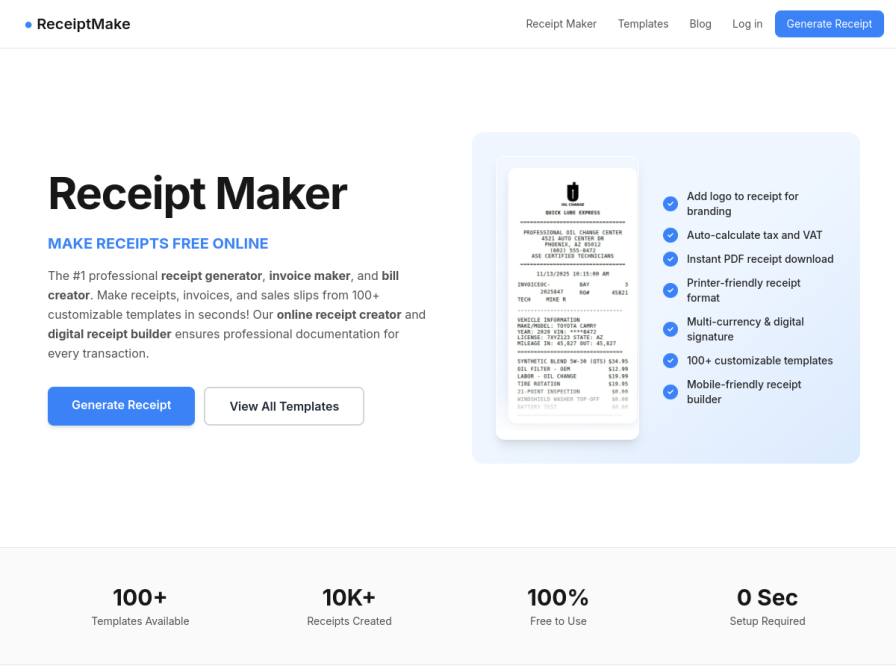
10 fictional AI personas. Exploratory perspectives, not a survey of real customers. Methodology & limitations
Simulated interest
AI synthesis, not measured demand
Suggested price range
No numeric price estimates in the answers. Ask a pricing follow-up to collect them.
Response sentiment
What this panel suggests
First-time visitors are interested in ReceiptMake’s speed, template library, and “100% free” promise, but the page leaves enough ambiguity that people hesitate before signing up. The biggest confusion is around pricing and watermarks: the page says “No, Receiptmake does not add watermarks to your receipts,” yet also mentions a premium plan to remove watermarks, which some respondents read as contradictory and a signal that the free version may be unprofessional. That uncertainty matters because several responses are looking for legitimate, audit-friendly documentation rather than a novelty tool. There is also skepticism about whether the receipts are suitable for tax, HMRC, bookkeeping, or reimbursement use. A second gap is workflow fit: the product feels oriented toward creating new receipts, not digitizing or organizing existing ones. People said they’d sign up if the tool clearly addressed professional use, trusted record-keeping, and possibly import/scan/categorization for existing receipts.
Pricing & positioning
Keep the free-first funnel, but make the free vs. premium boundary explicit before asking for signup. The biggest issue from these answers is trust and comprehension, not stated price resistance.
Clarify exactly what premium removes or unlocks, and reconcile any watermark messaging. If premium exists, frame it as a professional upgrade for branding/control rather than a fix for a confusing free tier.
Recurring themes
“The claim of "Privacy first" is reassuring, but I'd want to understand the "upgrade to premium" for removing watermarks – does that mean free receipts have some sort of mark that makes them unprofessional?”Read Curtis Roberts’s response →
“I need professional documentation, not something that feels like a novelty.”Read Terry Glover’s response →
“It seems more focused on creating new receipts rather than documenting existing ones.”Read Samuel Keeling’s response →
Objections to investigate
- Ambiguity regarding watermarks on the free tier
- Uncertainty about professional validity for tax/audit compliance
- Lack of features for digitizing existing paper records
Use these findings to plan customer interviews or experiments. How to interpret AI research
What the panel said
Click a name to open that persona’s full profile.
Terry GloverneutralLanding here, I'm a bit unsure if this is just for generating receipts for clients or if it can help me digitize my own scattered paper receipts for expenses. The core functionality seems clear – creating receipts quickly. What makes me hesitant is the mention of "novelty use cases"; I need professional documentation, not something that feels like a novelty. I'd leave if I couldn't quickly find a way to either create a reimbursement-style receipt for myself or process existing paper ones into a digital format. To sign up, I'd want to see a clear path for documenting my own expenses, perhaps a feature for uploading and categorizing scanned receipts, and reassurance that it's robust enough for proper bookkeeping, not just quick, disposable receipts.
Curtis RobertsneutralIt's unclear how robust the "professional" aspect of these receipts is. While it says "free to use" and "no sign-up required," which is great for quick tasks, I'd need to see more proof of its suitability for official bookkeeping. My main concern is data security and how these receipts hold up for HMRC. The claim of "Privacy first" is reassuring, but I'd want to understand the "upgrade to premium" for removing watermarks – does that mean free receipts have some sort of mark that makes them unprofessional? If it genuinely generates clean, error-free PDFs suitable for my monthly accountant checks without any hidden costs or compromises on professionalism, I'd consider signing up, especially for the time savings.
Simulated interest: 40/100
Samuel KeelingneutralLanding on Receipt Make, I appreciate the "100% Free to Use" claim, as my current system of templates and spreadsheets is free. The ability to generate receipts quickly is appealing, especially the "Travel receipt (Taxi, Rideshare) with customizable tax" as I often need that. However, the page doesn't clearly explain how this tool helps me *organize* the expenses I've already incurred, which is my primary problem. It seems more focused on creating new receipts rather than documenting existing ones. If it could somehow import or scan my existing receipts and categorize them automatically, I'd consider signing up. The "premium" option to remove watermarks is also a bit unclear – are there watermarks on the free version?
Simulated interest: 40/100
Kanti JoshineutralThe fact that it is "100% Free to Use" is appealing, and "0 Sec Setup Required" sounds very efficient. I do process a lot of paper receipts, so the idea of creating digital ones quickly is helpful. However, what makes me hesitant is that I'm not sure how it handles actual reconciliation with bank statements or if it can categorize expenses automatically for GST purposes. It says it's "perfect for bookkeeping, expense tracking, and novelty use cases," but I need something more robust for compliance. If I could see clear options for expense categorization relevant to Indian GST or if it integrates with accounting software I use, I might consider signing up for an account to save templates, especially if the premium upgrade to remove watermarks is reasonably priced.
Simulated interest: 40/100
Shane StammneutralLanding on ReceiptMake, I'm a bit unclear on how it integrates with my existing system. It says "100% Free to Use" and "No sign-up required to generate receipts," which is appealing, but then mentions upgrading for a "paid subscription plan" to remove watermarks and for "commercial use." What are the actual costs for a small business like mine that needs professional receipts without watermarks? The ability to auto-calculate tax and VAT, and the 100+ templates are good, but the pricing ambiguity makes me hesitant to commit time. If I could see a clear, affordable pricing structure for removing watermarks, that would make me consider signing up.
Simulated interest: 30/100
Cindy ConnellyneutralRight, so landing on this site, the first thing I'd wonder is how it actually works for restaurant receipts. It shows car service ones, but does it do itemised meals with separate drinks and service charges? It says '100+ templates' but doesn't show any restaurant examples upfront, which is a bit unclear. If I can't easily see it'll do what I need for The Gilded Spoon, I might just leave. What would make me sign up, or at least try it properly, is seeing a clear example of a restaurant receipt template that I can actually adapt. The fact it's free and says 'no sign-up required' to generate is a big plus, as I wouldn't want to waste time if it's not suitable. If it can help me sort out the supplier receipts faster than my current scanning method, that would be brilliant.
Simulated interest: 40/100
Jorge FayneutralThe page title and description are clear enough: it's a free online receipt generator. The fact that it's 100% free and requires no sign-up is a big plus, aligning with my preference for simple, cost-effective tools. I'd leave if I encountered any hidden costs or mandatory sign-ups for basic functionality. What would make me sign up? If I could easily save custom templates for my recurring client reimbursements, that would be a significant workflow optimization. I'd also want to confirm that the 'free' tier doesn't have a watermark, as the premium upgrade mentions removing them, which is a bit unclear.
Simulated interest: 60/100
Madeline AbernathyneutralWhat immediately catches my eye is the promise of "100% Free to Use" and "0 Sec Setup Required." That sounds incredibly efficient, which is exactly what I need given how much time I spend on administrative tasks. The ability to generate professional receipts instantly with over 100 templates could be a lifesaver for creating client invoices or tracking miscellaneous expenses. I'm a bit unclear on how "Privacy First" works in practice – is all data truly processed locally and not stored anywhere? I'd also want to understand if the "free" aspect has limitations before I fully commit, beyond the mention of a watermark on paid upgrades. If it truly streamlines receipt creation and tracking without complicated setup, I would definitely consider signing up, especially if it integrates well with my existing spreadsheet system.
Simulated interest: 75/100
Emilian EberhardtneutralThe page title and description are clear enough, but I'm not entirely sure how it works with the many templates shown. It says 'free to use,' which is good, but then mentions a premium upgrade to remove watermarks. Are there watermarks on the free version? That's unclear. I would consider signing up if I could easily create receipts for staff reimbursements and courier charges, with clear options for itemizing costs and calculating totals without manual errors. The ability to add logos and auto-calculate tax is also beneficial for professional records, even if it's just for internal use here.
Simulated interest: 30/100
Kamla JhaneutralThe initial impression is quite good; the claim of being the "#1 professional receipt generator" and offering 100+ templates is appealing, especially since it mentions "bookkeeping, expense tracking" which is precisely what I do. The fact that it's "100% Free to Use" and requires "0 Sec Setup" is a huge draw. What makes me hesitant is the mention of a "watermark" on free receipts and the suggestion to "upgrade to our paid subscription plan" to remove it. I'm always trying to keep costs down and use free tools, so I'd need to see if the watermark is intrusive or if the "free account" option to save templates is sufficient. If the free version is truly functional for my record-keeping without annoying watermarks, I might not even consider signing up for a paid plan. However, if the watermarks are noticeable or if saving templates requires an account I’m hesitant to create, I might stick to my current manual system.
Simulated interest: 30/100
Keep exploring.
Find your next question or see which topics divide AI panels.
What would you ask next?
Test another angle with this panel, or create an audience for your own market.