
Looking at jsontables (https://www.jsontables.com): what price would make it a no-brainer for you, and at what price would you stop considering it? What would you expect to get for that money? Also say the maximum you would pay per month in USD (0 if nothing).
Page reviewed
JSON to Table & Excel Converter — Free Online Tool | JSON Tables
https://www.jsontables.com/ (opens in a new tab)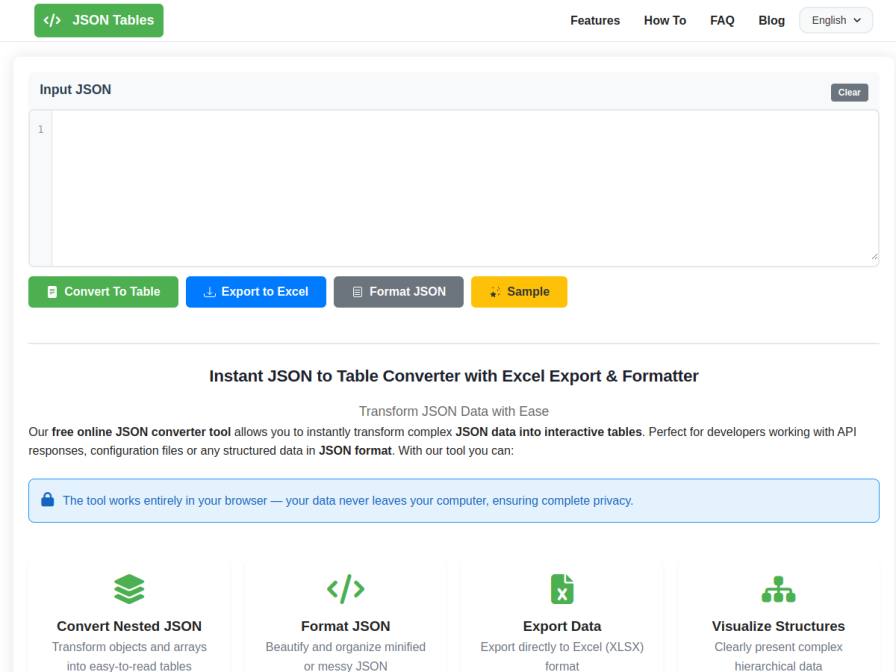
10 fictional AI personas. Exploratory perspectives, not a survey of real customers. Methodology & limitations
Simulated interest
AI synthesis, not measured demand
Suggested price range
Median $10 · simulated willingness to pay
Response sentiment
What this panel suggests
The synthetic audience is moderately interested in jsontables, but the pricing signal is strongly usage-dependent. For basic, one-off JSON-to-table conversion, the product is already seen as a no-brainer at $0 because it runs in the browser and is privacy-friendly. That matches the current page positioning as a free online tool for converting JSON, exporting to Excel, and formatting/validating data. Where willingness to pay appears, it is tied to added workflow value rather than the core converter itself: respondents mention larger file handling beyond the current 10MB cap, API access for automation, batch processing, and more dependable nested-structure exports. The supplied willingness-to-pay stats show a median of $10/month and a high of $25/month, while some respondents would pay nothing for the current scope. Existing scripting tools such as Python or jq remain a substitute for technically comfortable users. Overall, the answers suggest a free-first product with potential paid upside only if jsontables expands into automation-oriented workflows.
Pricing & positioning
Keep the current free tool as the default value proposition; a paid tier only seems plausible if it adds automation-oriented capabilities that go beyond the present browser-only workflow.
For the use case described, $0 is the clear no-brainer for basic conversion/formatting/export. The synthetic answers cluster around a modest paid range only when the product adds things like API access, batch processing, larger-file handling, or stronger reliability for nested JSON and Excel export. The supplied willingness-to-pay stats show a median of $10/month and a high of $25/month, with some respondents at $0 for the current scope. That is not a launch/stop decision, just a pricing signal for follow-up research.
Recurring themes
“The fact that it's free and works entirely in the browser addresses my concerns about data privacy.”Read Jessica Feeney’s response →
“If there were a paid tier that offered more advanced features, like handling larger files beyond 10MB or perhaps an API for automation, I could see myself paying around $15-$20 per month.”Read Jessica Feeney’s response →
“I'd expect robust handling of nested structures and reliable Excel export for that price.”Read Mozes Prinsen’s response →
Objections to investigate
- Current free tier is enough for many basic users
- Existing scripting tools can substitute for paid usage
- No programmatic access reduces paid appeal for automation workflows
Use these findings to plan customer interviews or experiments. How to interpret AI research
What the panel said
Click a name to open that persona’s full profile.
Jessica FeeneypositiveThis tool looks really promising for quickly converting JSON snippets into tables, which is a huge time saver for me. The fact that it's free and works entirely in the browser addresses my concerns about data privacy. If there were a paid tier that offered more advanced features, like handling larger files beyond 10MB or perhaps an API for automation, I could see myself paying around $15-$20 per month. I'd expect robust support and maybe batch processing capabilities for that price. If it remained just the free version, it's already a no-brainer for basic use.
Simulated interest: 75/100
Lean KreutzpositiveThis tool looks useful for quickly inspecting API responses, especially the nested data. Since it's free and runs client-side, it's already a no-brainer for basic use. If there were a paid tier, I'd consider it if it offered programmatic access or handled significantly larger files beyond the stated 10MB limit, maybe with team collaboration features. For my current needs, I wouldn't pay for this specific service. My maximum acceptable price is $0 per month.
Ellen RatkepositiveThis tool looks like a great free option for quickly converting JSON to tables and exporting to Excel, which is exactly what I'm doing with test run outputs. The fact that it processes data entirely in the browser is a significant plus for privacy. If there were a premium tier that offered API access for automation, I might consider paying up to $10 per month. For the current free offering, it's hard to put a price on it, but it's already a no-brainer for my daily tasks.
Simulated interest: 75/100
Mozes PrinsenpositiveThis tool seems quite useful for quickly converting JSON data into a more manageable table format, which I sometimes need when dealing with API payloads or survey exports before I clean them. The fact that it's browser-based and ensures data privacy is a significant plus. A 'no-brainer' price would be around $5-$10 per month for unlimited use, as it would save me considerable time on those initial, smaller data wrangling tasks. Above $25 per month, I'd start questioning if my existing Python scripts or other tools could handle it more efficiently, especially for larger or more complex datasets that might exceed the implied size limits or require more advanced logic. I'd expect robust handling of nested structures and reliable Excel export for that price.
Simulated interest: 75/100
Robyn ZulaufpositiveMy current process of moving JSON data into spreadsheets is time-consuming, so a tool that automates this would be incredibly valuable. For it to be a no-brainer, I'd expect it to handle complex, deeply nested JSON structures efficiently and allow for some customization in how the data is presented in the table. If it could reliably convert my order and shipment payloads with minimal manual intervention, I'd consider paying around $20 per month. Anything over $30 per month would start to feel too expensive for my budget, especially since this is a tool I'd use for reporting and audits, not directly for sales.
Simulated interest: 70/100
Dinkar BanerjeeneutralThis tool looks like a good free option for basic JSON to table conversions and formatting, which I already use a similar browser-based tool for. However, for my daily work with large, deeply nested transaction logs, I doubt this free version would be sufficient. If there were a paid tier that could handle significantly larger files (beyond the 10MB mentioned) and offer more advanced validation or perhaps batch processing capabilities, I might consider it. A "no-brainer" price would be around $5/month for those advanced features. Anything over $15/month would likely be too much, considering I already have workarounds and the risk of human error is my primary concern, not the tool itself being free.
Simulated interest: 30/100
Aurélienne DupuispositiveThis tool seems quite useful for quickly converting raw JSON into tables and then exporting to Excel, which is exactly what I often need to do for my colleagues. The fact that it's free and works entirely in the browser, ensuring privacy, is a big plus. If it were to offer more advanced features, like handling very large files beyond the 10MB limit or perhaps some basic data cleaning or transformation options directly within the tool, I might consider a subscription. For now, a price point around $5-$10 per month would make it a no-brainer for enhanced features, but the free version is already very functional. Anything above $20 per month would be too much for a tool I primarily use for quick conversions.
Simulated interest: 70/100
Ricardo LoweneutralThe fact that this is a free online tool is a definite plus, as I spend a lot of time wrestling with JSON data for reports. If it can reliably handle the messy, inconsistent schemas I often get, I'd consider a paid tier. A 'no-brainer' price might be around $5-$10 per month for basic usage, perhaps up to $20 for more advanced features or higher limits. I'd expect it to handle larger files than the 10MB mentioned in the FAQ and offer more robust export options. Anything over $30 a month, especially with the current free offering, would make me stop considering it.
Simulated interest: 60/100
Jan RennerneutralThe free tier of JSON Tables seems pretty capable, especially for my use case of quickly inspecting JSON payloads for internal APIs. The ability to convert to a table and export to Excel is useful for sharing with non-technical colleagues. I wouldn't pay for this as it stands, since `jq` and Python scripts cover my needs. If it offered an API for automated processing or significantly enhanced handling of extremely large or complex nested structures beyond what I can already manage with my current tools, I might consider a subscription. A "no-brainer" price for a more advanced feature set, maybe $5/month, but anything over $10/month would be a tough sell for a tool I primarily use for quick checks.
Simulated interest: 30/100
Chakrika AgarwalneutralThe tool itself is free, and that's honestly what I'd expect for something I'd use for quick, one-off conversions. For something that would reliably handle my daily 15,000-row lead data validations, especially with nested JSON, I'd need more than just a simple converter. I'd need it to integrate with my workflow, perhaps offer some level of automated validation rules, or even API access for programmatic use. Without those advanced features, I wouldn't consider paying. If it were to offer those kinds of capabilities, I might consider a price point around $10-$15 per month.
Simulated interest: 30/100
Keep exploring.
Find your next question or see which topics divide AI panels.
What would you ask next?
Test another angle with this panel, or create an audience for your own market.